HERCULES
High-Performance In-Memory & Ad-hoc File System designed for modern large-scale, data-intensive computing in HPC and AI environments.
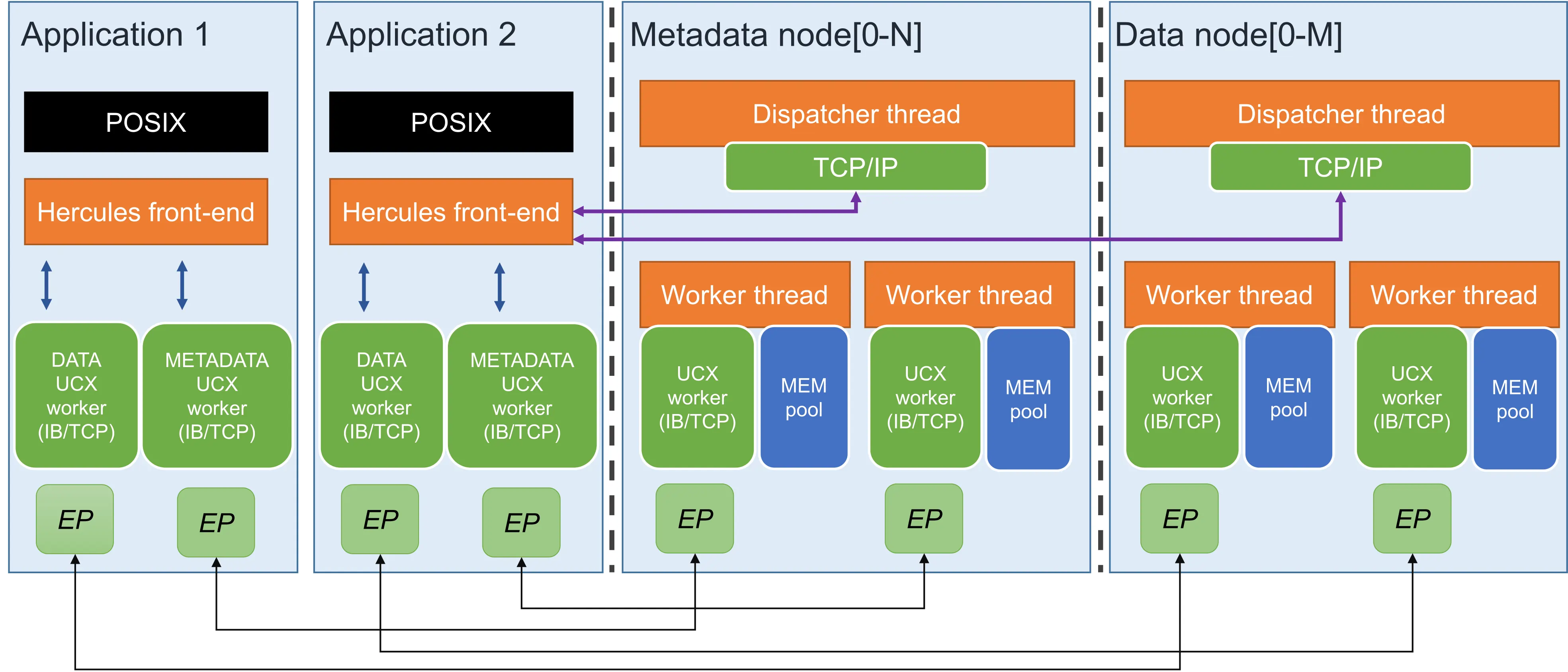
High-Performance In-Memory & Ad-hoc File System designed for modern large-scale, data-intensive computing in HPC and AI environments.

Designed to alleviate the strain on traditional HPC storage systems by dynamically utilizing local storage resources.
Uses main memory (DRAM) and optionally NVMe to establish a high-performance, temporary storage layer with UCX integration.
Implements runtime elasticity, allowing storage services to dynamically adjust capacity based on application needs.
Supports transparent migration of data to efficiently utilize and redistribute available resources across the cluster.
Achieves resilience through sophisticated replication management techniques and a relaxed consistency model.
Unified Communication X
HERCULES follows a client-server design model where the client itself is responsible for the server entities deployment.
Dispatcher thread and a pool of worker threads to balance workload.
Ensuring compatibility with most standard HPC applications.
Exploits RDMA-capable protocols for zero-copy data transfers.
Two-tier metadata structure distributed across nodes.
The architecture is built on a classic client-server design model with distinct, distributed entities.

HERCULES is a CMake-based project. You can build it from source or use Spack package manager.
Ensure you have the following packages installed before compilation:
Clone the repo and run the following commands:
git clone https://github.com/arcos-uc3m-hercules/hercules.git
mkdir build
cd build
cmake ..
make
make install
Add the repository under the admire namespace and install:
git clone https://gitlab.arcos.inf.uc3m.es/admire/spack.git
cd hercules
spack repo add spack
spack install hercules
spack load hercules
After compilation, the project generates key binaries like
libhercules_posix.so (for I/O interception), and hercules_server.
Hercules enables access via API library or LD_PRELOAD.
We provide scripts to launch deployments easily based from a configuration file (see below).
Use the script "scripts/hercules". It reads initialization parameters from hercules.conf.
hercules start -f <CONF_PATH>
export LD_PRELOAD=build/tools/libhercules_posix.soscripts/hercules stop -f Requires specifying hostfiles for metadata and data servers manually.
hercules start -m <meta_host> -d <data_host> -f <CONF>
Key fields for the hercules.conf file.
Last research papers detailing the HERCULES architecture.
Future Generation Computer Systems
Future Generation Computer Systems
ISC High Performance 2023
Euro-Par 2023: Parallel Processing